Clearing and forwarding software for Tanzania
Kani LMS is clearing and forwarding software for Tanzania that keeps every clearing job in one file: documents, dates, containers, expenses and the invoice. You see what profit each file made while the work is still going.
Who it is for
Clearing and forwarding agents in Dar es Salaam and across Tanzania, from five people in one office to teams handling jobs at the port, the ICDs and the border.
Clearing and forwarding software that follows the whole job
One file for every import and export
Open one file per job. It holds the BL number, shipper, consignee, shipping line, vessel, ports, arrival dates, ICD, cargo and documents.
Attach the commercial invoice, packing list and bill of lading (PDF, Word, Excel or image files up to 32 MB), and add dated status notes such as "released and delivered to the customer's warehouse" so everyone knows where the job stands.
See the dates before charges start
Each import records documents received, expected and actual arrival, discharge, carry-in, demurrage start and storage start. Filter your list by any of these dates to find the jobs that need attention.

Costs approved before money moves
Every cost, including customs and duties, is requested against the file. A manager reviews it first, then a second approver signs it off.
Containers, owners and returns
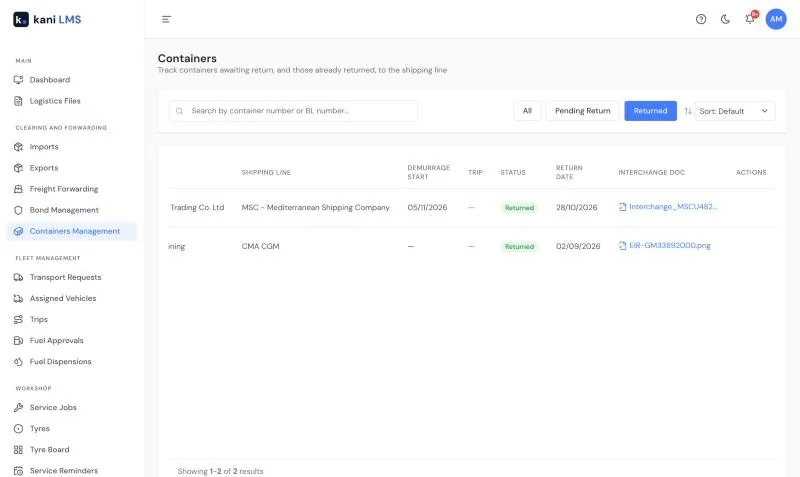
Record who owns each container (shipping line, shipper, your company or a rental) and follow it until it is returned, with proof of return. Read more about container tracking and demurrage.
Quote, invoice and profit
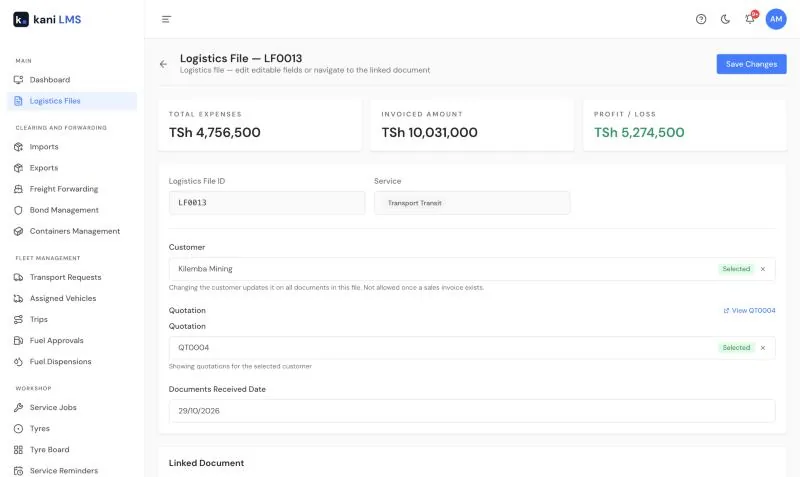
Send a quotation, link it to the file, and turn it into the invoice when the work is done. Profit or loss sits at the top of the file and moves as costs come in. See expense approvals and profit per file.
Transport and transit bonds in the same file
When cargo goes by road, raise a transport request from the import, assign a vehicle and follow the trip. Transit bonds set on containers, vehicles and bulk loads are tracked in Bond Management with their T1 reference, bond value and open or acquitted status. Read about fleet management in Kani LMS.
How it works
- Open the logistics file when the documents arrive.
- Add containers, costs and daily updates as the job moves.
- Invoice the customer and check the profit on the file.
Questions and answers
Does Kani LMS submit customs declarations?
No. Kani LMS does not file with TRA or connect to TANCIS. Keep using TANCIS for declarations. Kani LMS manages the job around it: the file and its customs documents, the transit bonds, the dates, the costs, the containers and the profit.
Can we see which jobs are close to storage or demurrage charges?
Every import records the storage start and demurrage start dates, and you can filter the list by them. Containers are tracked until they are returned.
Can we work in shillings and dollars on the same job?
Yes. Costs and invoices can be in either currency on the same file.
Will it work with our accountant?
Approved invoices and expenses go across to QuickBooks as you work. If you use another accounting system, tell us and we will look at the integration.
How much does it cost?
TZS 30,000 per user per month, with every feature included. The minimum is 3 users.
TZS 30,000 per user, per month
Every feature is included. The minimum is 3 users, so you start at TZS 90,000 a month.
See full pricing and training options · Read the Kani LMS user guide